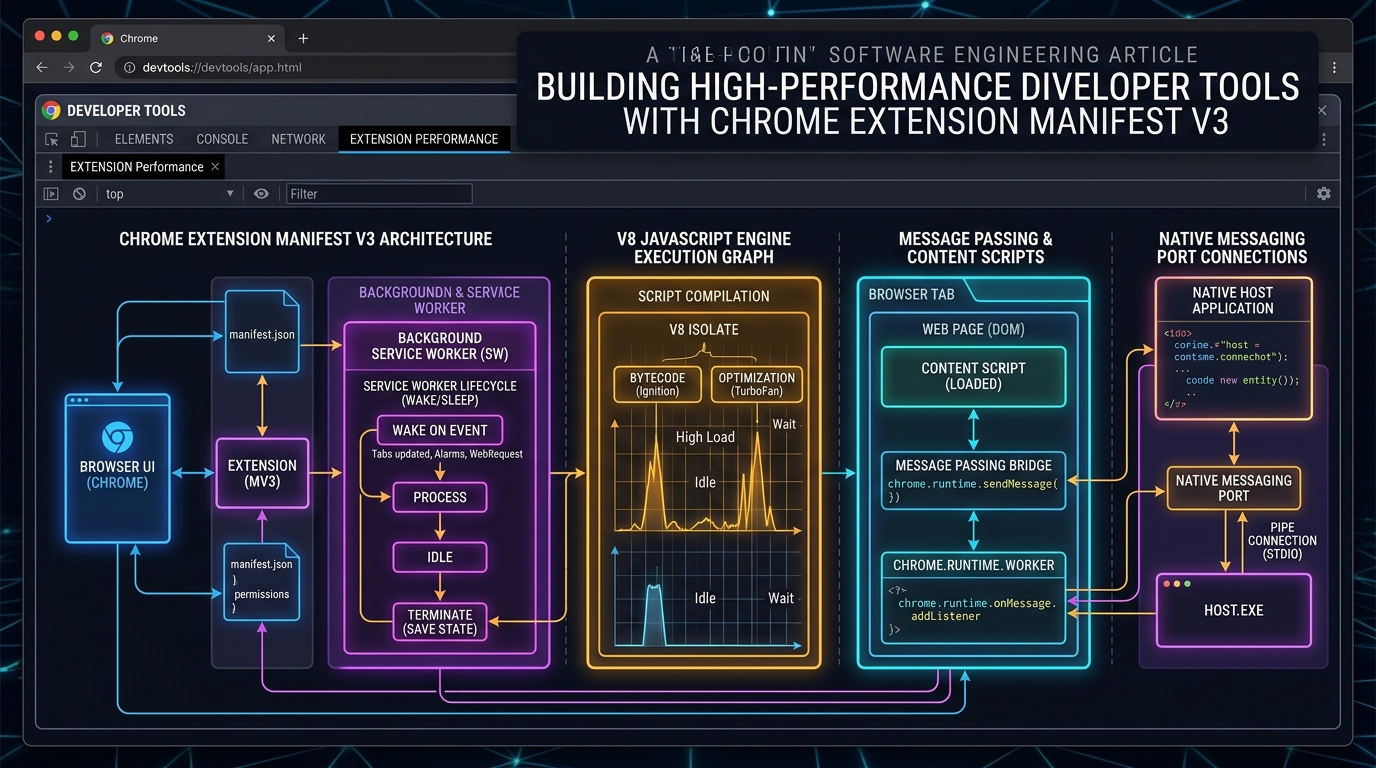
The Shift to Manifest V3: Why Background Scripts Disappeared
Under Chrome's older Manifest V2 architecture, extension developers relied on persistent background pages that ran continuously in memory. While convenient, this led to memory bloat where dozens of installed extensions consumed gigabytes of RAM in the background.
Manifest V3 (MV3) replaced persistent background pages with Service Workers. Service workers are strictly ephemeral: Chrome terminates them after 30 seconds of inactivity.
Designing for Ephemeral State Persistence
In MV3, you can never assume an in-memory variable will exist when the next browser event arrives. Every state transition must be backed by durable local storage:
// Safe state hydration in MV3 background service worker
chrome.runtime.onMessage.addListener((message, sender, sendResponse) => {
  (async () => {
    const { sessionData } = await chrome.storage.local.get('sessionData');
    const updated = processEvent(sessionData, message);
    await chrome.storage.local.set({ sessionData: updated });
    sendResponse({ success: true, state: updated });
  })();
  return true; // Keep message channel open for async response
});
Bridging Native Desktop Software via Native Messaging
For power users, a browser extension is most potent when it interfaces directly with host OS binaries (e.g. system hardware monitors, local Git repositories, or audio drivers).
Using chrome.runtime.connectNative('com.rajendra.sysguard'), the browser spawns a native OS process and establishes communication over standard input/output (stdin/stdout) with 32-bit length-prefixed JSON packets.
This unlocks true hybrid architecture: a clean Web-based UI inside Chrome combined with native C++/Rust/Go performance directly on the operating system.